by
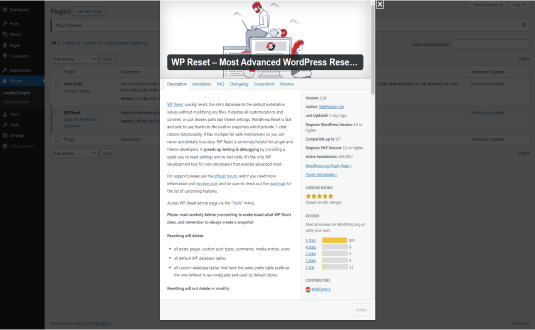
by The WP Reset plugin for WordPress is a tool designed to reset a WordPress website to its default settings, making it an invaluable utility for developers and administrators who need to quickly restore a site to a clean state. It allows for various levels of resets, providing flexibility for different use cases, such as testing, debugging, or starting over after a failed project. Below is an in-depth look at WP Reset, explaining its features, benefits, use cases, and how it works.
Introduction to WP Reset Plugin
WP Reset is a comprehensive WordPress plugin designed to simplify the process of resetting a WordPress website without having to manually delete databases or files. Whether you’re a developer, a site administrator, or someone testing WordPress themes and plugins, WP Reset offers an efficient and controlled method of returning a website to its original state.
WP Reset allows you to delete content, themes, plugins, and other WordPress settings and configurations. It does this without affecting the site’s database tables, meaning it can be used to test or develop themes and plugins, reset installations for a fresh start, or remove unwanted content.
Key Features of WP Reset
- Complete Site Reset
The plugin provides a one-click reset option to restore the site to its initial installation state. This means that all posts, pages, customizations, and plugins are removed. However, core WordPress files, themes, and database tables remain intact, making it easy to return the site to a usable state for further work. - Selective Reset
WP Reset is not limited to a full reset. Users can choose to reset specific areas of the site, such as:- Post types: Reset only the posts, pages, or custom post types without affecting other parts of the site.
- Themes and Plugins: Deactivate, delete, and reset themes and plugins.
- Widgets and Menus: Reset site widgets and navigation menus.
- Users: Reset users or delete all users except for the admin.
- Safety Mechanisms
WP Reset includes multiple safeguards to prevent accidental loss of critical data. For example, the plugin offers a confirmation process to ensure the user is certain about resetting their site. It also includes the option to create a System Snapshot, which is a backup of your site’s current settings, themes, and plugins. This makes it easy to restore your site to its previous configuration if needed. - Snapshot Feature
The Snapshot feature allows users to create a backup of the current WordPress environment, including active themes, plugins, and settings. Snapshots can be taken manually or set to auto-create at scheduled intervals. This allows users to restore a site to its previous state even after performing a reset. - Multisite Compatibility
WP Reset also works with WordPress Multisite installations, providing a similar level of functionality. You can reset individual sites within a Multisite network or reset the entire network. - Database Tools
The plugin comes equipped with tools to manage your WordPress database. You can optimize and repair tables, view database information, and manage orphaned database entries. This is particularly useful for developers who need to keep their databases clean during testing. - Reverts User Roles and Capabilities
WP Reset allows administrators to reset user roles and capabilities, which is important for testing user permission scenarios or when you need to remove changes made by multiple users over time. - Site Deletion
For users who no longer need a site, WP Reset can fully delete the WordPress installation, including the database. This is helpful when a site is no longer necessary, and you need to clear out all traces of it quickly.
Use Cases for WP Reset
- Development and Testing
Developers often need to reset WordPress sites when testing themes, plugins, or custom features. WP Reset simplifies the process by allowing them to quickly reset the site to a known baseline, ensuring that tests can be run in a clean environment. - Troubleshooting Issues
If your WordPress site is encountering issues, such as plugin conflicts, theme malfunctions, or other configuration problems, WP Reset can help by reverting the site to a known working state. This eliminates complex troubleshooting processes, allowing you to quickly determine whether issues are related to site content or configuration. - Rebuilding Sites
If you’ve made significant changes to your site and need to start fresh, WP Reset can help. It provides an easy way to wipe content and settings without deleting core files, ensuring the essential structure of the site remains intact. - Managing Multiple Websites
For agencies or individuals managing multiple WordPress sites, WP Reset is a powerful tool for maintaining consistency. You can easily reset individual sites or multiple sites on a network, ensuring all your installations are uniform and up-to-date. - Educational and Training Purposes
WP Reset is ideal for WordPress educators or trainers who need a clean slate for teaching students. They can easily reset their test environments to a baseline installation, allowing for hands-on learning without worrying about accumulated data from previous lessons.
How WP Reset Works
When you install and activate WP Reset, it adds a new option in the WordPress dashboard under the Tools section. From there, you can access various reset options. The plugin operates by removing content such as posts, pages, media, and custom post types, while keeping the database and core WordPress installation intact.
Here’s a breakdown of how to use WP Reset:
- Install the Plugin: Download and install WP Reset from the WordPress plugin repository.
- Take a Snapshot: Before performing any reset, you can create a snapshot of your site’s current configuration for backup purposes.
- Choose the Reset Type: You can choose between a full reset or selective resets based on the elements you wish to remove.
- Confirm and Reset: After selecting your reset option, WP Reset will ask for confirmation before proceeding. Once confirmed, the plugin will begin the reset process.
WP Reset Pros and Cons
Pros:
- Ease of Use: WP Reset provides a simple and intuitive interface, making it easy for beginners and advanced users alike to reset their sites.
- Flexibility: It offers both complete and selective resets, allowing users to choose exactly what to reset.
- Speed: The reset process is quick, which is especially important for developers and site administrators who need to save time.
- Backup and Restore: With the snapshot feature, users can create backups and restore their sites to previous configurations, which adds an additional layer of security.
- Multisite Support: WP Reset supports WordPress Multisite, making it useful for developers managing multiple sites.
Cons:
- Risk of Data Loss: While WP Reset includes safety features, there is always a risk of data loss if users are not cautious. It’s important to always take a snapshot before performing a reset.
- Limited Backup Options: WP Reset’s snapshot feature is primarily for configuration backups and does not replace a full backup system for your entire website (i.e., files and database).
- Not a Full Backup Plugin: WP Reset is not designed to replace full site backup plugins, which may be necessary for more comprehensive protection.
Conclusion
WP Reset is a powerful plugin that simplifies the process of resetting and restoring WordPress sites. Whether you’re a developer, site administrator, or educator, WP Reset offers an easy way to start fresh, test new features, troubleshoot issues, or manage multiple sites. Its flexibility, speed, and safety features make it an invaluable tool for anyone who needs to maintain a clean and well-organized WordPress environment. However, users should always back up their content and settings before performing any resets to ensure that important data is not lost.