
Is Business Directory Plugin safe to install?
Good choice: actively maintained
- Pass: Actively maintained Last updated 1 month ago (version 6.4.29).
- Pass: Compatible with current WordPress Tested up to WordPress 7.1; the current release is 7.1. Needs PHP 7.4+.
- Pass: Well rated Rated 4.6/5 by 505 users on WordPress.org.
- Pass: Widely used Active on 10,000+ sites.
- Pass: Responsive support 5 of 5 support threads resolved in the last two months.
Check every plugin on your site with the free WordPress plugin checker →
Based on WordPress.org data, checked Nov 21, 2026. Always keep plugins updated and test changes on a staging site.
Business Directory Plugin – Easy Listing Directories for WordPress: A Comprehensive Guide
The Business Directory Plugin – Easy Listing Directories for WordPress is a versatile and user-friendly tool for creating and managing business directories on WordPress websites. With powerful features, a customizable interface, and seamless integration with WordPress themes, this plugin allows users to transform their sites into functional, monetized directories with ease. Below, we explore its features, benefits, use cases, customization options, and how to get started.
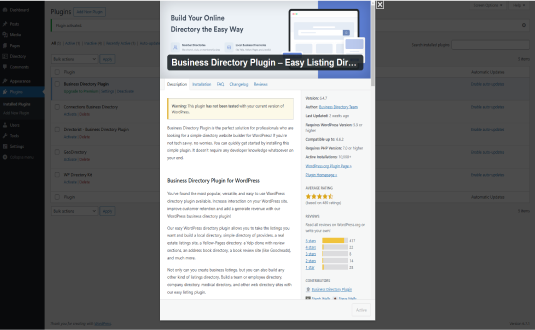
What is the Business Directory Plugin?
The Business Directory Plugin is a widely-used WordPress plugin designed for creating professional business directories. It enables website owners to showcase business listings, organized into categories, with search and filtering capabilities. The plugin is ideal for creating local directories, niche-specific catalogs, job boards, or global directories.
With both free and premium versions, the Business Directory Plugin is accessible to a range of users, from hobbyists to enterprise-level businesses. The plugin’s modular nature allows you to extend its functionality by adding premium modules based on your needs.
Key Features of the Business Directory Plugin
The plugin comes with an array of features that make it an ideal choice for building listing directories:
- Customizable Listing Fields
- Add or remove fields to tailor the listings to your directory’s niche.
- Common fields include business name, address, phone number, website, social media links, and more.
- Front-End Submissions
- Business owners or users can submit their listings via a user-friendly front-end interface.
- Offers an approval workflow, ensuring that submitted listings meet quality standards.
- Responsive and Mobile-Friendly Design
- Ensures that directories look great on any device, providing a seamless user experience.
- Search and Filtering Options
- Visitors can easily find businesses using keyword searches, categories, and location-based filters.
- Payment Integration
- Monetize your directory by charging for premium listings or offering paid submission options.
- Supports popular payment gateways such as PayPal and Stripe.
- SEO Optimization
- Listings are SEO-friendly with customizable URLs, meta tags, and schema markup support.
- Rating and Review System
- Enables users to leave reviews and ratings for businesses, adding credibility and engagement.
- Google Maps Integration
- Display the location of businesses on an interactive map, enhancing usability.
- Pre-Built Templates
- Offers ready-made directory templates that can be customized to match your website’s branding.
- Multilingual Support
- Compatible with popular translation plugins, making it suitable for global audiences.
Benefits of Using the Business Directory Plugin
- Ease of Use
- Designed for beginners and professionals alike, the plugin requires no coding knowledge.
- Scalability
- Start with a basic directory and expand its features with premium modules as your needs grow.
- Cost-Effectiveness
- The free version includes essential features, while the premium version provides advanced functionalities without breaking the bank.
- Enhanced User Engagement
- Features like reviews, ratings, and maps encourage users to interact with listings.
- Monetization Opportunities
- Create additional revenue streams through paid listings, advertising, or subscriptions.
Use Cases for the Business Directory Plugin
The plugin is versatile and can be used for various types of directories:
- Local Business Directory
- Showcase businesses in a specific city or region, such as restaurants, shops, or service providers.
- Industry-Specific Directory
- Create directories for specific industries, such as healthcare, legal services, or real estate.
- Classifieds and Job Boards
- List job opportunities or classified ads with contact details and descriptions.
- Membership Directories
- Build directories for organizations, clubs, or associations, listing members and their contact information.
- Event Directories
- Showcase upcoming events, conferences, or activities with detailed information and booking links.
How to Set Up the Business Directory Plugin
Follow these steps to create your directory:
- Install and Activate the Plugin
- Log in to your WordPress dashboard, go to Plugins > Add New, search for “Business Directory Plugin,” and click Install Now.
- Configure Basic Settings
- Access the plugin’s settings from the WordPress admin panel. Configure general settings such as submission rules, payment options, and notification preferences.
- Create Listing Categories
- Organize your directory by creating categories for different types of businesses or services.
- Customize Listing Fields
- Use the field editor to add, remove, or modify fields to suit your directory’s needs.
- Add Listings
- Manually add listings or enable front-end submissions so users can contribute.
- Integrate Monetization
- Set up payment options for paid listings or featured placements.
- Design Your Directory
- Use the plugin’s templates and styling options to align the directory with your site’s branding.
- Test and Launch
- Preview your directory, test the submission and payment processes, and then launch it.
Premium Modules and Extensions
The Business Directory Plugin offers premium add-ons to extend its functionality:
- Google Maps Module
- Add maps to your listings for location-based directories.
- Payment Gateway Module
- Expand your payment options with additional gateways.
- Ratings and Reviews Module
- Allow users to rate and review businesses.
- Claim Listings Module
- Enable businesses to claim and manage their listings.
- Directory Theme Pack
- Get access to professionally designed themes specifically for directories.
- File Attachments Module
- Allow businesses to upload files like brochures or portfolios to their listings.
Tips for Maximizing Your Directory’s Potential
- Focus on SEO
- Optimize your directory’s content and structure to improve visibility on search engines.
- Encourage Reviews
- Promote user-generated content like reviews and ratings to build trust and engagement.
- Promote Your Directory
- Use social media, email marketing, and local advertising to drive traffic.
- Keep Listings Updated
- Regularly review listings to ensure accuracy and relevance.
- Monitor Performance
- Use analytics tools to track user behavior and identify areas for improvement.
Conclusion
The Business Directory Plugin – Easy Listing Directories for WordPress is a feature-rich and adaptable solution for building directories on WordPress. With its ease of use, robust functionality, and customization options, it caters to a wide range of directory types and business goals. Whether you’re looking to create a local business directory, a niche-specific catalog, or a global platform, this plugin provides the tools to succeed. By leveraging its features and premium extensions, you can create a professional, monetized directory that delivers value to both businesses and users.
Downloads & growth
How often Business Directory Plugin is downloaded from WordPress.org each day, over the last 90 days.
Source: WordPress.org download statistics. Downloads include updates on existing sites, so tall spikes usually mark a new release. See what's trending →
How to install Business Directory Plugin
- Open the plugin installer. In your WordPress dashboard go to Plugins → Add New Plugin.
- Search for it. Type “Business Directory Plugin” and pick the one by Strategy11 Team.
- Install and activate. Click Install Now, then Activate.
Install with a zip file or WP-CLI
Download the zip from the WordPress.org plugin page, then go to Plugins → Add New Plugin → Upload Plugin, choose the file and click Install Now. Or from the command line:
wp plugin install business-directory-plugin --activateRequirements: WordPress 5.9+ · PHP 7.4+ · tested up to WordPress 7.1.5
Hooks & customisation
Business Directory Plugin 6.4.29 fires 75 actions and 194 filters. Use them from your child theme or a snippets plugin to change how it behaves without editing its files.
// Some themes work better without using the page template.
apply_filters( 'wpbdp_use_single', false );

// Allow custom code to change the currency for different currencies per form.
apply_filters( 'wpbdp_currency', $currency );

// Add extra strings with their replacements.
apply_filters( 'wpbdp_custom_strings', $strings );

// Filters whether to display the pagination in the listings wrapper or outside o…
apply_filters( 'wpbdp_display_pagination_in_listings_wrapper', true );

// Load additional scripts or styles used only in BD plugin pages. This hook can…
do_action( 'wpbdp_enqueue_admin_scripts' );

// Set a different image size for uploaded files.
apply_filters( 'wpbdp_img_size', … );Business Directory Plugin: frequently asked questions
Is Business Directory Plugin free?
Yes. Business Directory Plugin is free to download from the official WordPress.org plugin directory and is licensed under the GPL, so you can use it on as many sites as you like. Some developers sell a separate Pro version or paid add-ons; check the developer's website for details.
Is Business Directory Plugin safe to use?
Business Directory Plugin is actively maintained: the latest version was released 1 month ago. Users rate it 4.6 out of 5 from 505 reviews on WordPress.org. As with any plugin, keep it updated and only install it from WordPress.org or the developer.
Does Business Directory Plugin work with WordPress 7.1?
Yes. Business Directory Plugin is tested up to WordPress 7.1, the current release. It requires WordPress 5.9 or later and PHP 7.4 or later.
How many websites use Business Directory Plugin?
Business Directory Plugin is active on 10,000+ WordPress sites, according to WordPress.org. It is currently at version 6.4.29, last updated on October 20, 2026.
What are the best alternatives to Business Directory Plugin?
Plugins that do a similar job and are actively maintained include HivePress (10,000+ installs), Directorist: AI-Powered Business Directory, Listings & Classified Ads (20,000+ installs), GeoDirectory (10,000+ installs).
Can I customise Business Directory Plugin without editing its code?
Yes. Business Directory Plugin 6.4.29 fires 75 actions and 194 filters that you can use from a child theme or a code snippets plugin, so your changes survive plugin updates. Browse all 269 hooks with examples.
Done for you
Need Business Directory Plugin to do more?
Clear starting prices, an exact quote before any work, and changes built so plugin updates never wipe them.
Plugin customisation
from $149
New features or changed behaviour, without editing the plugin’s files.
- Built as a companion plugin, so updates never wipe it
- Exact quote before we start
- Tested on staging, then deployed
Typical turnaround: 3–7 business days
Choose thisCustom hook snippet
from $49
A small, update-safe change built on the plugin’s own hooks.
- Code written against the plugin’s actions and filters
- Tested on a staging copy of your site
- Install instructions included
Typical turnaround: 2–3 business days
Choose thisBug or conflict fix
from $79
Errors, broken layouts or two plugins that don’t get along.
- Find the cause on a staging copy
- Fix without breaking updates
- Explain what was wrong
Typical turnaround: 1–3 business days
Choose thisNot sure which fits? Describe what you need and we’ll suggest the simplest option.
Need Business Directory Plugin customised?
Tell us what you want changed, added or fixed and we'll reply with an estimate.
WP EXPERTS is independent and not affiliated with Strategy11 Team. Plugin names and logos belong to their owners. Version, rating and install figures from WordPress.org, checked Nov 21, 2026.





