
Is Donations via PayPal safe to install?
Good choice: actively maintained
- Pass: Actively maintained Last updated 3 months ago (version 1.9.11).
- Pass: Compatible with current WordPress Tested up to WordPress 7.1; the current release is 7.1.
- Pass: Well rated Rated 4.7/5 by 27 users on WordPress.org.
- Pass: Widely used Active on 20,000+ sites.
Check every plugin on your site with the free WordPress plugin checker →
Based on WordPress.org data, checked Nov 19, 2026. Always keep plugins updated and test changes on a staging site.
Donations via PayPal WordPress Plugin: A Comprehensive Guide
In the modern age of digital connectivity, accepting online donations has become a cornerstone for non-profits, bloggers, content creators, and small businesses. PayPal, a globally recognized payment gateway, offers a simple and secure way to collect funds online. When integrated with WordPress through a plugin, it becomes even more accessible and efficient. This guide explores the features, benefits, setup, and best practices of using a PayPal donation plugin for WordPress.
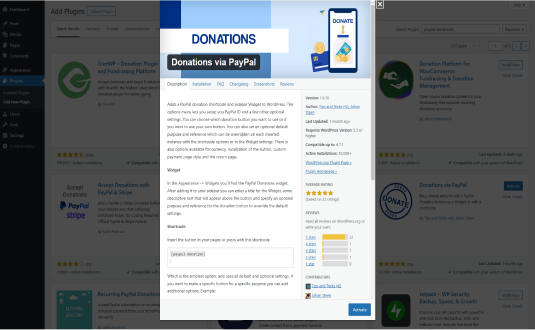
Why Use a PayPal Donation Plugin for WordPress?
PayPal donation plugins are designed to simplify the process of accepting contributions directly through your WordPress website. Here’s why they are essential:
- Ease of Use: These plugins provide user-friendly interfaces that eliminate the need for complex coding or third-party services.
- Global Accessibility: PayPal supports multiple currencies, making it an ideal choice for reaching a global audience.
- Secure Transactions: PayPal’s robust security protocols ensure that donor information is safe from fraud or theft.
- Customization Options: Many plugins allow you to design donation buttons or forms that match your website’s branding.
- Analytics and Reporting: Track donations and generate reports to monitor your fundraising campaigns effectively.
Top Features to Look for in a PayPal Donation Plugin
When choosing a PayPal donation plugin for WordPress, consider the following features:
- Integration with PayPal: The plugin should seamlessly connect with your PayPal account.
- Customizable Donation Buttons: Options to design buttons that fit your website’s style.
- Donation Forms: Support for forms that can collect donor details like name, email, and custom messages.
- Recurring Donations: Enable users to set up monthly or annual contributions.
- Multilingual Support: Ensure accessibility for a diverse audience.
- Mobile Responsiveness: Compatibility with smartphones and tablets.
- Thank You Pages and Emails: Automatically send acknowledgments to donors.
- Analytics Dashboard: Monitor performance and track donor data.
Popular PayPal Donation Plugins for WordPress
Here are some of the most widely used PayPal donation plugins available for WordPress:
- PayPal Donations
- Features a simple shortcode to place donation buttons anywhere on your site.
- Supports multiple currencies.
- Includes options for fixed or custom donation amounts.
- GiveWP
- A comprehensive donation plugin with robust PayPal integration.
- Offers recurring donations and donor management tools.
- Allows customization of donation forms and buttons.
- WPForms
- A versatile form builder that integrates with PayPal for donations.
- Drag-and-drop interface to create custom donation forms.
- Supports additional payment gateways for flexibility.
- Simple PayPal Donations
- Lightweight plugin for adding PayPal donation buttons to your site.
- Easy configuration and minimal setup.
- Suitable for beginners.
- DonorBox
- Advanced features like recurring donations, donor profiles, and fundraising goals.
- Integrates with PayPal and other payment gateways.
- Mobile-friendly and highly customizable.
How to Set Up a PayPal Donation Plugin on WordPress
Follow these steps to integrate a PayPal donation plugin into your WordPress website:
- Install the Plugin:
- Navigate to your WordPress dashboard.
- Go to
Plugins > Add Newand search for the desired PayPal donation plugin. - Click “Install Now” and then “Activate.”
- Configure Settings:
- Go to the plugin’s settings page.
- Enter your PayPal account details.
- Choose your preferred currency and donation options.
- Create Donation Buttons or Forms:
- Use the plugin’s built-in tools to design buttons or forms.
- Customize the appearance, amounts, and donor information fields.
- Add to Your Website:
- Copy the shortcode provided by the plugin.
- Paste it into pages, posts, or widgets where you want the donation button or form to appear.
- Test the Integration:
- Perform a test donation to ensure the setup works correctly.
- Verify that payments are received in your PayPal account.
Best Practices for Using PayPal Donation Plugins
To maximize the effectiveness of your donation campaign, consider these tips:
- Clear Messaging:
- Clearly explain the purpose of your fundraiser.
- Use compelling images and testimonials to build trust.
- Suggested Donation Amounts:
- Provide suggested amounts to make the decision process easier for donors.
- Include a custom amount option for flexibility.
- Mobile Optimization:
- Ensure your donation forms are mobile-friendly for seamless transactions on any device.
- Thank Donors:
- Set up automatic thank-you messages or emails to acknowledge contributions.
- Consider offering small incentives, like downloadable content, to show appreciation.
- Promote Your Campaign:
- Share your donation page on social media, newsletters, and blogs.
- Encourage supporters to spread the word.
- Transparency:
- Provide updates on how the funds are being used.
- Share progress reports to build donor trust.
Advantages of PayPal Donation Plugins
- Global Reach: Accept donations from international donors without hassle.
- Cost-Effective: Minimal setup costs and reasonable transaction fees.
- Secure Payments: Protects donor data with industry-standard encryption.
- Scalable: Suitable for small fundraisers as well as large-scale campaigns.
Conclusion
Integrating PayPal donation plugins into your WordPress website can transform your fundraising efforts. With easy setup, robust security, and customizable features, these plugins empower you to connect with supporters worldwide and streamline the donation process. By following best practices and leveraging the right tools, you can create an impactful donation system that supports your goals and strengthens donor relationships.
Downloads & growth
How often Donations via PayPal is downloaded from WordPress.org each day, over the last 90 days.
Source: WordPress.org download statistics. Downloads include updates on existing sites, so tall spikes usually mark a new release. See what's trending →
How to install Donations via PayPal
- Open the plugin installer. In your WordPress dashboard go to Plugins → Add New Plugin.
- Search for it. Type “Donations via PayPal” and pick the one by mra13 / Team Tips and Tricks HQ.
- Install and activate. Click Install Now, then Activate.
Install with a zip file or WP-CLI
Download the zip from the WordPress.org plugin page, then go to Plugins → Add New Plugin → Upload Plugin, choose the file and click Install Now. Or from the command line:
wp plugin install paypal-donations --activateRequirements: WordPress 5.5+ · tested up to WordPress 7.1.5
Hooks & customisation
Donations via PayPal 1.9.11 fires 0 actions and 7 filters. Use them from your child theme or a snippets plugin to change how it behaves without editing its files.
// Filter in views/paypal-button.php
apply_filters( 'paypal_donations_amount', $amount );

// Filter in views/paypal-button.php
apply_filters( 'paypal_donations_merchant_email', $pd_options['paypal_account'] );

// Filter in views/paypal-button.php
apply_filters( 'paypal_donations_purpose_html', … );

// Filter in views/paypal-button.php
apply_filters( 'paypal_donations_url', $url );

// Filter in views/paypal-button.php
apply_filters( 'pd_button_localized_value', $button_localized );

// Filter in paypal-donations.php
apply_filters( 'plugin_locale', get_locale(), $domain );Donations via PayPal: frequently asked questions
Is Donations via PayPal free?
Yes. Donations via PayPal is free to download from the official WordPress.org plugin directory and is licensed under the GPL, so you can use it on as many sites as you like. Some developers sell a separate Pro version or paid add-ons; check the developer's website for details.
Is Donations via PayPal safe to use?
Donations via PayPal is actively maintained: the latest version was released 3 months ago. Users rate it 4.7 out of 5 from 27 reviews on WordPress.org. As with any plugin, keep it updated and only install it from WordPress.org or the developer.
Does Donations via PayPal work with WordPress 7.1?
Yes. Donations via PayPal is tested up to WordPress 7.1, the current release. It requires WordPress 5.5 or later.
How many websites use Donations via PayPal?
Donations via PayPal is active on 20,000+ WordPress sites, according to WordPress.org. It is currently at version 1.9.11, last updated on August 17, 2026.
What are the best alternatives to Donations via PayPal?
Plugins that do a similar job and are actively maintained include Easy Accept Payments via PayPal (6,000+ installs), Paytium: Mollie payment forms & donations (2,000+ installs), SureDonation (4,000+ installs).
Can I customise Donations via PayPal without editing its code?
Yes. Donations via PayPal 1.9.11 fires 0 actions and 7 filters that you can use from a child theme or a code snippets plugin, so your changes survive plugin updates. Browse all 7 hooks with examples.
Done for you
Need Donations via PayPal to do more?
Clear starting prices, an exact quote before any work, and changes built so plugin updates never wipe them.
Plugin customisation
from $149
New features or changed behaviour, without editing the plugin’s files.
- Built as a companion plugin, so updates never wipe it
- Exact quote before we start
- Tested on staging, then deployed
Typical turnaround: 3–7 business days
Choose thisCustom hook snippet
from $49
A small, update-safe change built on the plugin’s own hooks.
- Code written against the plugin’s actions and filters
- Tested on a staging copy of your site
- Install instructions included
Typical turnaround: 2–3 business days
Choose thisBug or conflict fix
from $79
Errors, broken layouts or two plugins that don’t get along.
- Find the cause on a staging copy
- Fix without breaking updates
- Explain what was wrong
Typical turnaround: 1–3 business days
Choose thisNot sure which fits? Describe what you need and we’ll suggest the simplest option.
Need Donations via PayPal customised?
Tell us what you want changed, added or fixed and we'll reply with an estimate.
WP EXPERTS is independent and not affiliated with mra13 / Team Tips and Tricks HQ. Plugin names and logos belong to their owners. Version, rating and install figures from WordPress.org, checked Nov 19, 2026.







