Is Pods safe to install?
Good choice: actively maintained
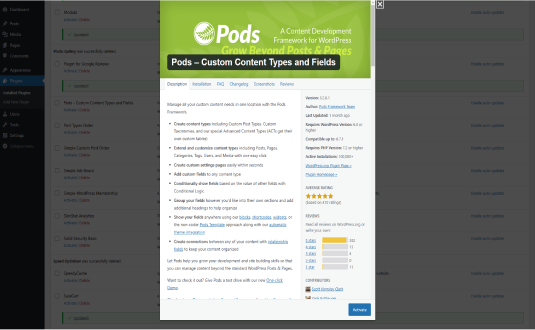
- Pass: Actively maintained Last updated 3 months ago (version 3.3.9.2).
- Pass: Compatible with current WordPress Tested up to WordPress 7.1; the current release is 7.1. Needs PHP 7.2+.
- Pass: Well rated Rated 4.8/5 by 418 users on WordPress.org.
- Pass: Widely used Active on 100,000+ sites.
- Pass: Responsive support 12 of 12 support threads resolved in the last two months.
Check every plugin on your site with the free WordPress plugin checker →
Based on WordPress.org data, checked Nov 17, 2026. Always keep plugins updated and test changes on a staging site.
Pods – Custom Content Types and Fields: Simplifying Content Management in WordPress
WordPress is a powerful content management system (CMS), but for advanced projects requiring custom data management, its out-of-the-box functionality can fall short. That’s where Pods – Custom Content Types and Fields comes into play. Pods is a free, versatile plugin that empowers developers and content creators to extend WordPress by adding custom content types, taxonomies, and fields to enhance functionality without writing extensive code.
In this article, we’ll explore the features, benefits, and real-world applications of Pods, demonstrating how it simplifies complex data management for WordPress sites.
Understanding Custom Content Types and Fields
Before diving into Pods, let’s clarify the concepts of custom content types and fields:
- Custom Content Types: WordPress has built-in content types like posts and pages. However, for more specific needs (e.g., products, portfolios, events), custom content types allow you to create tailored content structures.
- Custom Fields: Custom fields enable you to attach additional metadata to content types. For example, a “Books” content type might include fields for “Author,” “Publication Year,” and “Genre.”
Pods makes it easy to create and manage these custom types and fields directly from the WordPress admin dashboard, saving time and effort.
Features of Pods – Custom Content Types and Fields
The Pods plugin offers a robust set of tools designed to extend WordPress functionality. Here are its core features:
1. Custom Post Types
Pods allows you to create and manage custom post types effortlessly. Whether you’re building a directory, portfolio, or product catalog, Pods gives you the flexibility to define your content structures.
2. Custom Taxonomies
With Pods, you can create custom taxonomies to organize your content more effectively. For instance, you can add taxonomies like “Genres” for movies or “Locations” for events.
3. Custom Fields
Pods supports a wide range of field types, including:
- Text
- Numbers
- Dates
- Relationships (e.g., linking one post type to another)
- Media uploads
- Checkboxes and dropdowns
4. Relationships
One of Pods’ standout features is its ability to create relationships between different content types. For example, you can link “Authors” to “Books” or “Venues” to “Events,” enabling dynamic and interconnected content.
5. Custom Settings Pages
For advanced users, Pods lets you create custom settings pages for site-specific configurations. This feature is especially useful for developers building client websites with unique settings.
6. Templates and Shortcodes
Pods simplifies content display with built-in templating tools. You can use shortcodes and custom templates to show your custom content types and fields in a user-friendly way without delving into PHP.
7. REST API and Integrations
Pods is fully compatible with WordPress’ REST API, making it ideal for headless WordPress projects. It also integrates seamlessly with popular plugins like WooCommerce, Elementor, and Advanced Custom Fields (ACF).
8. Migration and Import/Export
Easily migrate or back up your custom content using Pods’ import/export tools. This feature is invaluable for developers working across multiple environments.
Why Choose Pods?
Pods stands out among WordPress plugins for custom content management due to its flexibility, ease of use, and developer-friendly features. Here’s why Pods is a preferred choice for many:
1. No Coding Required
While developers can extend Pods with custom code, the plugin is designed to be accessible to non-technical users. Its intuitive interface allows you to create and manage custom content without touching PHP.
2. Free and Open Source
Unlike many premium plugins, Pods is completely free and open-source. Its active community ensures regular updates and extensive documentation.
3. Scalability
Pods is suitable for projects of all sizes, from small blogs to enterprise-level websites. It handles complex data relationships and large datasets with ease.
4. Developer Tools
For developers, Pods provides robust hooks, filters, and API endpoints for advanced customizations. It also supports integration with popular WordPress development tools.
5. Community and Support
The Pods community is active and supportive, with forums, tutorials, and documentation available to help users at every skill level.
Real-World Applications of Pods
Pods can be used in countless scenarios to enhance WordPress functionality. Here are a few examples:
1. Building a Movie Database
A movie review website can use Pods to create a custom post type for “Movies” with fields like “Director,” “Release Year,” “Genre,” and “Rating.” Taxonomies like “Genres” can help categorize movies, while relationships can link “Actors” to their respective films.
2. Creating an Events Calendar
For an events-based website, Pods can be used to create a custom post type for “Events” with fields like “Event Date,” “Venue,” and “Ticket Price.” Relationships can link venues to their events, allowing dynamic content display.
3. Developing a Real Estate Directory
A real estate website can utilize Pods to create a “Properties” post type with fields like “Location,” “Price,” “Number of Bedrooms,” and “Property Type.” Taxonomies like “Regions” or “Property Types” can further organize listings.
4. Designing an Educational Platform
An educational site can use Pods to manage courses, instructors, and students. Relationships can connect “Courses” with “Instructors” and “Students” to facilitate dynamic content display and personalized dashboards.
5. Building Custom WooCommerce Features
Pods integrates seamlessly with WooCommerce, enabling you to add custom fields or taxonomies to your products. For example, you could add a “Manufacturer” field or a custom taxonomy for “Product Certifications.”
How to Get Started with Pods
Step 1: Install the Plugin
- Log in to your WordPress dashboard.
- Go to “Plugins > Add New.”
- Search for “Pods – Custom Content Types and Fields.”
- Click “Install Now” and activate the plugin.
Step 2: Create a Custom Post Type
- Navigate to “Pods Admin > Add New.”
- Select “Create New” and choose “Custom Post Type.”
- Define your post type settings, such as name, labels, and features (e.g., support for thumbnails or excerpts).
Step 3: Add Custom Fields
- Within your newly created post type, click “Add Fields.”
- Choose the field types you need (e.g., text, number, relationship).
- Save your changes.
Step 4: Display Content
- Use Pods’ built-in shortcodes to display custom content on your site.
- For advanced layouts, create custom templates using PHP or integrate with your theme.
Pros and Cons of Pods
Pros
- Free and open-source.
- Intuitive interface for non-developers.
- Extensive customization options.
- Strong community support and documentation.
- Scales well for large projects.
Cons
- Learning curve for beginners unfamiliar with custom content types.
- May require additional plugins or coding for highly complex projects.
Comparing Pods with Similar Plugins
Pods competes with plugins like Advanced Custom Fields (ACF) and Toolset. Here’s how it compares:
- Cost: Pods is entirely free, while ACF and Toolset have premium versions.
- Ease of Use: Pods offers a beginner-friendly interface, while ACF caters more to developers.
- Features: Pods excels in managing relationships and creating custom post types, whereas ACF focuses on adding fields to existing types.
Conclusion
The Pods – Custom Content Types and Fields plugin is a game-changer for WordPress users seeking to extend their site’s functionality. By simplifying the creation and management of custom content types, taxonomies, and fields, Pods empowers users to build dynamic, feature-rich websites without extensive coding.
Whether you’re a developer building complex applications or a site owner looking for an intuitive solution, Pods offers the flexibility, scalability, and support you need. Its robust feature set and free pricing make it an indispensable tool for any WordPress project.
With Pods, the possibilities are endless. Start building your custom content today and unlock the full potential of your WordPress site!
How to install Pods
- Open the plugin installer. In your WordPress dashboard go to Plugins → Add New Plugin.
- Search for it. Type “Pods” and pick the one by Scott Kingsley Clark.
- Install and activate. Click Install Now, then Activate.
Install with a zip file or WP-CLI
Download the zip from the WordPress.org plugin page, then go to Plugins → Add New Plugin → Upload Plugin, choose the file and click Install Now. Or from the command line:
wp plugin install pods --activateRequirements: WordPress 6.3+ · PHP 7.2+ · tested up to WordPress 7.1.4
Hooks & customisation
Pods 3.3.9.2 fires 156 actions and 499 filters. Use them from your child theme or a snippets plugin to change how it behaves without editing its files.
// Filter the title of the Pods Metabox used in the post editor.
apply_filters( 'pods_meta_default_box_title', … );

// Allow filtering whether a user is a Pods Admin.
apply_filters( 'pods_is_admin', true, $additional_capabilities, '_super_admin', $user );

// Allow customization of shortcode output based on shortcode attributes.
apply_filters( 'pods_shortcode_output', $return, $tags, null, 'view' );

// Allow filtering of the default cache mode used for the Pods shortcode.
apply_filters( 'pods_shortcode_default_cache_mode', 'none' );

// Filter the template output.
apply_filters( 'pods_templates_post_template', $out, $code, $template_name, $this );

// Allow filtering whether a user is a Pods Admin.
apply_filters( 'pods_admin_capabilities', $pods_admin_capabilities, $additional_capabilities, $user );Pods: frequently asked questions
Is Pods free?
Yes. Pods is free to download from the official WordPress.org plugin directory and is licensed under the GPL, so you can use it on as many sites as you like. Some developers sell a separate Pro version or paid add-ons; check the developer's website for details.
Is Pods safe to use?
Pods is actively maintained: the latest version was released 3 months ago. Users rate it 4.8 out of 5 from 418 reviews on WordPress.org. As with any plugin, keep it updated and only install it from WordPress.org or the developer.
Does Pods work with WordPress 7.1?
Yes. Pods is tested up to WordPress 7.1, the current release. It requires WordPress 6.3 or later and PHP 7.2 or later.
How many websites use Pods?
Pods is active on 100,000+ WordPress sites, according to WordPress.org. It is currently at version 3.3.9.2, last updated on August 31, 2026.
What are the best alternatives to Pods?
Plugins that do a similar job and are actively maintained include Meta Box (500,000+ installs).
Can I customise Pods without editing its code?
Yes. Pods 3.3.9.2 fires 156 actions and 499 filters that you can use from a child theme or a code snippets plugin, so your changes survive plugin updates. Browse all 655 hooks with examples.
Done for you
Need Pods to do more?
Clear starting prices, an exact quote before any work, and changes built so plugin updates never wipe them.
Plugin customisation
from $149
New features or changed behaviour, without editing the plugin’s files.
- Built as a companion plugin, so updates never wipe it
- Exact quote before we start
- Tested on staging, then deployed
Typical turnaround: 3–7 business days
Choose thisCustom hook snippet
from $49
A small, update-safe change built on the plugin’s own hooks.
- Code written against the plugin’s actions and filters
- Tested on a staging copy of your site
- Install instructions included
Typical turnaround: 2–3 business days
Choose thisBug or conflict fix
from $79
Errors, broken layouts or two plugins that don’t get along.
- Find the cause on a staging copy
- Fix without breaking updates
- Explain what was wrong
Typical turnaround: 1–3 business days
Choose thisNot sure which fits? Describe what you need and we’ll suggest the simplest option.
Need Pods customised?
Tell us what you want changed, added or fixed and we'll reply with an estimate.
WP EXPERTS is independent and not affiliated with Scott Kingsley Clark. Plugin names and logos belong to their owners. Version, rating and install figures from WordPress.org, checked Nov 17, 2026.