
Is Stripe Payment Forms by WP Simple Pay safe to install?
Good choice: actively maintained
- Pass: Actively maintained Last updated 2 days ago (version 4.17.7).
- Pass: Compatible with current WordPress Tested up to WordPress 7.1; the current release is 7.1. Needs PHP 7.4+.
- Pass: Well rated Rated 4.4/5 by 117 users on WordPress.org.
- Pass: Widely used Active on 8,000+ sites.
Check every plugin on your site with the free WordPress plugin checker →
Based on WordPress.org data, checked Nov 17, 2026. Always keep plugins updated and test changes on a staging site.
Stripe Payment Forms by WP Simple Pay Plugin: A Comprehensive Guide
Online payment solutions are vital for businesses operating in the digital space. The Stripe Payment Forms by WP Simple Pay plugin offers a streamlined way to accept credit card payments, subscriptions, and other transactions directly on your WordPress site. Designed for simplicity and flexibility, this plugin integrates seamlessly with Stripe, one of the most popular payment processors globally, to facilitate secure and user-friendly payment experiences.
This guide explores the features, benefits, setup, and applications of the Stripe Payment Forms plugin to help you make the most of it.
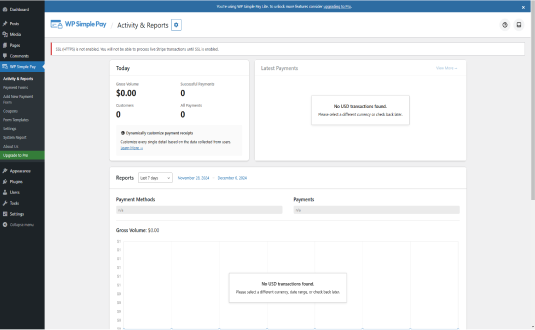
What is the Stripe Payment Forms Plugin?
The Stripe Payment Forms by WP Simple Pay plugin is a WordPress solution that allows website owners to accept online payments through customizable payment forms. It eliminates the need for a full shopping cart system, making it ideal for businesses, freelancers, nonprofits, and content creators looking for a quick and efficient way to collect payments.
The plugin is powered by Stripe, known for its robust security, global reach, and support for multiple payment methods, including credit cards, digital wallets, and bank transfers.
Key Features of the Stripe Payment Forms Plugin
1. No Coding Required
The plugin provides a user-friendly interface for creating payment forms, eliminating the need for complex coding or development expertise.
2. One-Time Payments and Subscriptions
Support both one-time transactions and recurring subscriptions, catering to various business models.
3. Customizable Payment Forms
Design payment forms that match your brand:
- Adjust colors, fonts, and layout.
- Add custom fields to collect additional customer information.
4. Multiple Payment Methods
Accept a wide range of payment methods, including:
- Major credit and debit cards.
- Apple Pay and Google Pay.
- ACH bank transfers (U.S. only).
5. Stripe Checkout Integration
Seamlessly integrate with Stripe’s secure hosted checkout pages for added security and compliance.
6. Coupon Codes and Discounts
Offer promotional discounts to your customers using built-in coupon code functionality.
7. Mobile-Friendly Design
Payment forms are fully responsive, ensuring a smooth checkout experience on mobile devices.
8. Multilingual and Multi-Currency Support
Serve international customers with support for multiple languages and over 135 currencies.
9. Secure Transactions
Leverage Stripe’s PCI-compliant infrastructure for secure payment processing.
10. Integrations with WordPress Tools
Integrate with other WordPress plugins, such as:
- Gravity Forms for advanced form-building options.
- WooCommerce for extended e-commerce functionality.
Benefits of Using Stripe Payment Forms
1. Simplified Payment Collection
Eliminate the need for complicated e-commerce setups by using lightweight, easy-to-configure payment forms.
2. Enhanced Customer Experience
Provide customers with a seamless and secure payment process, reducing cart abandonment rates.
3. Cost-Effective Solution
Avoid expensive e-commerce platform fees while still accepting online payments.
4. Flexibility for Various Use Cases
The plugin suits multiple business types, including service providers, nonprofits, and online educators.
5. Secure Payment Processing
With Stripe’s advanced fraud prevention and data encryption, you can assure customers their payment information is safe.
How to Set Up Stripe Payment Forms
Follow these steps to install and configure the plugin:
Step 1: Install the Plugin
- Log in to your WordPress dashboard.
- Navigate to Plugins > Add New.
- Search for “Stripe Payment Forms by WP Simple Pay.”
- Click Install Now, then activate the plugin.
Step 2: Connect to Stripe
- Go to WP Simple Pay > Settings.
- Click on the Connect with Stripe button.
- Log in to your Stripe account or create a new one.
- Follow the on-screen instructions to authorize the connection.
Step 3: Create a Payment Form
- Navigate to WP Simple Pay > Add New.
- Choose a form template (e.g., one-time payment, subscription).
- Customize the form fields, layout, and styling.
- Configure payment options, including currency, amount, and payment methods.
Step 4: Publish the Form
- Use the provided shortcode or block to embed the form on any page or post.
- Preview the page to ensure the form displays correctly.
- Publish the page to start accepting payments.
Practical Applications of Stripe Payment Forms
1. Service Payments
Freelancers and consultants can use the plugin to collect payments for their services, offering a straightforward checkout experience.
2. Memberships and Subscriptions
Create recurring payment plans for membership-based websites, online courses, or subscription boxes.
3. Donations
Nonprofits can accept donations through simple forms, with optional recurring donation options.
4. Event Ticketing
Sell tickets for events, webinars, or workshops without needing a full-fledged event management system.
5. Digital Products
Creators can sell e-books, music, software, or other digital goods directly from their WordPress site.
Advanced Features with WP Simple Pay Pro
The Pro version of the plugin unlocks advanced capabilities, such as:
- Payment Reminder Emails: Notify customers about upcoming or overdue payments.
- Conditional Logic: Display form fields based on user input.
- Payment Confirmation Pages: Redirect users to custom thank-you or confirmation pages after payment.
- Tax Handling: Automatically calculate and include taxes in transactions.
Customizing Stripe Payment Forms
1. Using Custom CSS
Tailor the look and feel of your forms with custom CSS. For example:
cssCopy code.stripe-payment-form {
    background-color: #f9f9f9;
    border: 1px solid #ddd;
    padding: 20px;
    border-radius: 5px;
}
Add this to your theme’s Additional CSS section under Appearance > Customize.
2. Adding Conditional Fields
Use plugins like Gravity Forms for advanced field logic, such as showing additional fields based on user selections.
Advantages of the Stripe Payment Forms Plugin
1. Speed of Implementation
Set up and start accepting payments within minutes, making it ideal for businesses in need of a quick solution.
2. Scalability
The plugin grows with your business, accommodating larger transactions, additional currencies, and more complex payment setups.
3. Low Maintenance
Minimal upkeep is required once the forms are configured, allowing you to focus on other aspects of your business.
4. Developer-Friendly
Developers can extend functionality using hooks, filters, and custom integrations.
Limitations
While the Stripe Payment Forms plugin is robust, there are some limitations to consider:
- Stripe Dependency: You must have a Stripe account to use the plugin, which may not be available in all countries.
- Limited Shopping Cart Functionality: The plugin is not a substitute for a full-fledged e-commerce platform like WooCommerce.
- Advanced Features in Pro Version: Some features, such as advanced reporting and conditional logic, are only available in the Pro version.
Best Practices for Using Stripe Payment Forms
1. Optimize Form Placement
Place payment forms prominently on your site to increase conversions. For example, position donation forms on your homepage or embed subscription forms on service pages.
2. Test Payment Flows
Regularly test your payment forms to ensure they function correctly across different devices and browsers.
3. Leverage Analytics
Use Stripe’s dashboard to monitor payment trends, identify popular products or services, and optimize your offerings.
4. Offer Multiple Payment Methods
Enable alternative payment options like Apple Pay or Google Pay to accommodate diverse customer preferences.
5. Keep Forms Simple
Minimize the number of fields to reduce friction in the checkout process, increasing the likelihood of successful transactions.
Conclusion
The Stripe Payment Forms by WP Simple Pay plugin is a versatile and efficient tool for WordPress users who want to accept online payments without the complexity of traditional e-commerce platforms. Its ease of use, security features, and flexibility make it an excellent choice for businesses, nonprofits, and creators looking to simplify their payment processes.
By leveraging the plugin’s capabilities, you can provide your customers with a seamless checkout experience while boosting your revenue streams. Whether you’re collecting donations, selling digital goods, or managing subscriptions, Stripe Payment Forms is a reliable and scalable solution to meet your needs.
How to install Stripe Payment Forms by WP Simple Pay
- Open the plugin installer. In your WordPress dashboard go to Plugins → Add New Plugin.
- Search for it. Type “Stripe Payment Forms by WP Simple Pay” and pick the one by Syed Balkhi.
- Install and activate. Click Install Now, then Activate.
Install with a zip file or WP-CLI
Download the zip from the WordPress.org plugin page, then go to Plugins → Add New Plugin → Upload Plugin, choose the file and click Install Now. Or from the command line:
wp plugin install stripe --activateRequirements: WordPress 5.9+ · PHP 7.4+ · tested up to WordPress 7.1.4
Hooks & customisation
Stripe Payment Forms by WP Simple Pay 4.17.7 fires 116 actions and 200 filters. Use them from your child theme or a snippets plugin to change how it behaves without editing its files.
// Filters the out of stock price option label.
apply_filters( 'simpay_out_of_stock_price_option_label', $out_of_stock_price_option_label, $this );

// Filter the minimum score allowed for a reCAPTCHA response to allow form submis…
apply_filters( 'simpay_recpatcha_minimum_score', $minimum_score );

// Fires after a scheduled action has been completed.
do_action( 'action_scheduler_completed_action', $action_id );

// Fires when Action Scheduler is ready: it is safe to use the procedural API aft…
do_action( 'action_scheduler_init' );

// Allows further processing after a Subscription has been created.
do_action( 'simpay_after_subscription_created', $subscription );

// Filters Payment Form's script variables.
apply_filters( 'simpay_form_script_variables', $temp, $this->id );Stripe Payment Forms by WP Simple Pay: frequently asked questions
Is Stripe Payment Forms by WP Simple Pay free?
Yes. Stripe Payment Forms by WP Simple Pay is free to download from the official WordPress.org plugin directory and is licensed under the GPL, so you can use it on as many sites as you like. Some developers sell a separate Pro version or paid add-ons; check the developer's website for details.
Is Stripe Payment Forms by WP Simple Pay safe to use?
Stripe Payment Forms by WP Simple Pay is actively maintained: the latest version was released 2 days ago. Users rate it 4.4 out of 5 from 117 reviews on WordPress.org. As with any plugin, keep it updated and only install it from WordPress.org or the developer.
Does Stripe Payment Forms by WP Simple Pay work with WordPress 7.1?
Yes. Stripe Payment Forms by WP Simple Pay is tested up to WordPress 7.1, the current release. It requires WordPress 5.9 or later and PHP 7.4 or later.
How many websites use Stripe Payment Forms by WP Simple Pay?
Stripe Payment Forms by WP Simple Pay is active on 8,000+ WordPress sites, according to WordPress.org. It is currently at version 4.17.7, last updated on November 17, 2026.
What are the best alternatives to Stripe Payment Forms by WP Simple Pay?
Plugins that do a similar job and are actively maintained include Payment Plugins for Stripe WooCommerce (100,000+ installs), Stripe Payment Forms by WP Full Pay (8,000+ installs), Payment Gateway of Stripe for WooCommerce (7,000+ installs).
Can I customise Stripe Payment Forms by WP Simple Pay without editing its code?
Yes. Stripe Payment Forms by WP Simple Pay 4.17.7 fires 116 actions and 200 filters that you can use from a child theme or a code snippets plugin, so your changes survive plugin updates. Browse all 316 hooks with examples.
Done for you
Need Stripe Payment Forms by WP Simple Pay to do more?
Clear starting prices, an exact quote before any work, and changes built so plugin updates never wipe them.
Plugin customisation
from $149
New features or changed behaviour, without editing the plugin’s files.
- Built as a companion plugin, so updates never wipe it
- Exact quote before we start
- Tested on staging, then deployed
Typical turnaround: 3–7 business days
Choose thisCustom hook snippet
from $49
A small, update-safe change built on the plugin’s own hooks.
- Code written against the plugin’s actions and filters
- Tested on a staging copy of your site
- Install instructions included
Typical turnaround: 2–3 business days
Choose thisBug or conflict fix
from $79
Errors, broken layouts or two plugins that don’t get along.
- Find the cause on a staging copy
- Fix without breaking updates
- Explain what was wrong
Typical turnaround: 1–3 business days
Choose thisNot sure which fits? Describe what you need and we’ll suggest the simplest option.
Need Stripe Payment Forms by WP Simple Pay customised?
Tell us what you want changed, added or fixed and we'll reply with an estimate.
WP EXPERTS is independent and not affiliated with Syed Balkhi. Plugin names and logos belong to their owners. Version, rating and install figures from WordPress.org, checked Nov 17, 2026.







