
Is WP Directory Kit safe to install?
Good choice: actively maintained
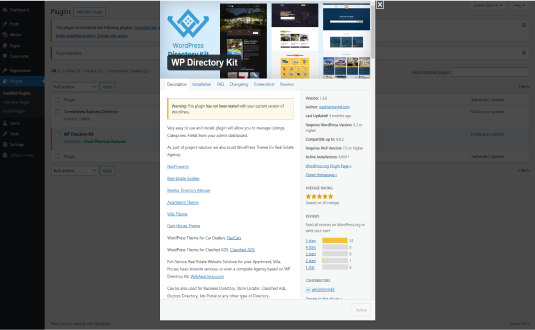
- Pass: Actively maintained Last updated 2 weeks ago (version 1.6.3).
- Pass: Compatible with current WordPress Tested up to WordPress 7.1; the current release is 7.1. Needs PHP 7.0+.
- Pass: Well rated Rated 4.9/5 by 35 users on WordPress.org.
- Pass: Widely used Active on 2,000+ sites.
Check every plugin on your site with the free WordPress plugin checker →
Based on WordPress.org data, checked Nov 19, 2026. Always keep plugins updated and test changes on a staging site.
WP Directory Kit WordPress Plugin: A Comprehensive Overview
WP Directory Kit is a robust and versatile WordPress plugin designed to create and manage directory-based websites with ease. Whether you’re building a business directory, classified ads platform, or event listing site, WP Directory Kit provides all the tools needed to get started. Its flexibility, extensive customization options, and user-friendly interface make it a go-to solution for developers and site owners.
Key Features of WP Directory Kit
1. Custom Post Types for Listings
The plugin allows you to define custom post types tailored to your directory’s needs. Each listing can include fields such as:
- Title and description
- Contact information
- Images or videos
- Categories and tags
- Custom fields for additional data (e.g., price, location, or ratings)
2. Advanced Search and Filtering
WP Directory Kit enhances user experience with powerful search and filtering capabilities. Visitors can:
- Search listings by keywords, categories, tags, or custom fields.
- Apply filters for refined results.
- Use geolocation features to find nearby listings.
3. Customizable Layouts
The plugin offers various pre-designed templates and layouts for listing pages, detail pages, and archives. Additionally, you can:
- Customize layouts using drag-and-drop builders.
- Add widgets for maps, featured listings, or recent posts.
- Use CSS for advanced design tweaks.
4. Interactive Maps
With built-in map functionality, WP Directory Kit integrates interactive maps into your directory. Key features include:
- Location markers for listings.
- Integration with Google Maps or OpenStreetMap.
- Clustering for dense areas to improve map readability.
5. Monetization Options
The plugin supports several monetization strategies, enabling site owners to generate revenue from their directories:
- Paid listing submissions with different pricing tiers.
- Subscription plans for recurring payments.
- Featured listings or ad placements for additional visibility.
6. User Accounts and Frontend Submissions
Allow users to register and manage their own listings via a dedicated dashboard. Features include:
- Frontend submission forms with customizable fields.
- User profiles to display their submitted listings.
- Review and approval workflows for submitted content.
7. Ratings and Reviews System
The plugin comes with an integrated ratings and reviews system, enabling users to leave feedback on listings. This functionality includes:
- Star ratings or numeric scores.
- Moderation tools for managing reviews.
- Sorting listings by ratings or popularity.
8. SEO Optimization
WP Directory Kit is optimized for search engines, helping your directory rank higher in search results. Features include:
- Schema markup for listings.
- Customizable meta titles and descriptions.
- Clean URLs and breadcrumb navigation.
9. Multilingual and Translation Ready
With compatibility for popular translation plugins like WPML and Polylang, WP Directory Kit ensures your directory can reach a global audience.
10. Integration with Popular Plugins
WP Directory Kit works seamlessly with other WordPress plugins, including:
- WooCommerce for eCommerce features.
- Contact Form 7 for custom inquiry forms.
- Elementor for advanced page design.
Use Cases for WP Directory Kit
1. Business Directories
Create a professional directory for local businesses, service providers, or niche industries. Include features like contact details, operating hours, and customer reviews.
2. Classified Ads
Build a classified ads platform where users can list items for sale, post job offers, or promote services. Enable category-specific fields for a tailored user experience.
3. Real Estate Listings
Showcase property listings with rich details such as location, price, and property type. Use interactive maps and filters to help users find their ideal property.
4. Event Directories
Organize and display upcoming events with features like event dates, ticket prices, and venue locations. Integrate calendar views and booking options for added functionality.
5. Job Boards
Create a job portal where employers can post job openings and job seekers can apply. Include categories for industries, salary ranges, and experience levels.
6. Tourism and Travel Directories
Develop a travel directory showcasing attractions, hotels, restaurants, and tours. Add user reviews and geolocation features to enhance usability.
7. Educational Directories
List educational institutions, courses, or training programs. Include filters for location, program type, and duration.
Benefits of Using WP Directory Kit
1. Ease of Use
The intuitive interface makes it easy for beginners to set up a directory, while advanced users can leverage its extensive customization options.
2. Cost-Effective Solution
WP Directory Kit offers a budget-friendly way to create a professional directory without the need for custom development.
3. Flexibility
The plugin’s modular structure allows you to build directories for any niche or industry. Custom post types, fields, and layouts ensure complete control over design and functionality.
4. Enhanced User Engagement
Interactive maps, advanced search filters, and reviews make your directory more engaging and user-friendly, encouraging visitors to return.
5. Scalability
As your directory grows, WP Directory Kit can handle increased data and traffic with minimal impact on performance.
Installation and Setup
- Install the Plugin Download WP Directory Kit from the official WordPress repository or a trusted marketplace. Upload it to your WordPress site and activate it.
- Configure Settings Set up general settings, including currency, default country, and map preferences.
- Create Listing Types Define custom post types and fields based on your directory’s purpose.
- Design Pages Customize listing layouts and design directory pages using pre-built templates or a drag-and-drop builder.
- Enable User Submissions Set up frontend submission forms and configure approval workflows.
- Monetize the Directory Define pricing plans and integrate with payment gateways like PayPal or Stripe.
- Launch Your Directory Embed the directory on your site using shortcodes or Gutenberg blocks.
Pricing and Support
WP Directory Kit is available at various pricing tiers, including free and premium versions. Premium plans offer additional features such as advanced analytics, priority support, and more design options. Support includes:
- Detailed documentation.
- Video tutorials.
- A dedicated helpdesk for technical assistance.
Conclusion
WP Directory Kit is an all-in-one solution for building and managing directory websites on WordPress. Its rich feature set, ease of use, and scalability make it a top choice for businesses and individuals looking to create engaging directories. Whether you’re building a local business directory, a global job board, or a specialized niche platform, WP Directory Kit provides the tools to make your vision a reality.
Downloads & growth
How often WP Directory Kit is downloaded from WordPress.org each day, over the last 90 days.
Source: WordPress.org download statistics. Downloads include updates on existing sites, so tall spikes usually mark a new release. See what's trending →
How to install WP Directory Kit
- Open the plugin installer. In your WordPress dashboard go to Plugins → Add New Plugin.
- Search for it. Type “WP Directory Kit” and pick the one by WPDirectoryKit.
- Install and activate. Click Install Now, then Activate.
Install with a zip file or WP-CLI
Download the zip from the WordPress.org plugin page, then go to Plugins → Add New Plugin → Upload Plugin, choose the file and click Install Now. Or from the command line:
wp plugin install wpdirectorykit --activateRequirements: WordPress 5.3+ · PHP 7.0+ · tested up to WordPress 7.1.5
Hooks & customisation
WP Directory Kit 1.6.3 fires 31 actions and 41 filters. Use them from your child theme or a snippets plugin to change how it behaves without editing its files.
// Fires after each specific row in the TGMPA Plugins list table.
do_action( "tgmpa_after_plugin_row_{$item['slug']}", $item['slug'], $item, $this->view_context );

// By default TGMPA only loads on the WP back-end and not in an Ajax call. Using…
apply_filters( 'tgmpa_load', ( is_admin() && ! defined( 'DOING_AJAX' ) ) );

// Filter a sanitized key string.
apply_filters( 'tgmpa_sanitize_key', $key, $raw_key );

// Filter the list of action links available following bulk plugin installs/updat…
apply_filters( 'tgmpa_update_bulk_plugins_complete_actions', $update_actions, $this->plugin_info );

// Fires when the bulk upgrader process is complete.
do_action( 'upgrader_process_complete', … );

// Filter: Allows modification of the rendered Elementor template content before…
apply_filters( 'wdk_render_elementor_template_output', $template_content, $layout_id, $post_data );WP Directory Kit: frequently asked questions
Is WP Directory Kit free?
Yes. WP Directory Kit is free to download from the official WordPress.org plugin directory and is licensed under the GPL, so you can use it on as many sites as you like. Some developers sell a separate Pro version or paid add-ons; check the developer's website for details.
Is WP Directory Kit safe to use?
WP Directory Kit is actively maintained: the latest version was released 2 weeks ago. Users rate it 4.9 out of 5 from 35 reviews on WordPress.org. As with any plugin, keep it updated and only install it from WordPress.org or the developer.
Does WP Directory Kit work with WordPress 7.1?
Yes. WP Directory Kit is tested up to WordPress 7.1, the current release. It requires WordPress 5.3 or later and PHP 7.0 or later.
How many websites use WP Directory Kit?
WP Directory Kit is active on 2,000+ WordPress sites, according to WordPress.org. It is currently at version 1.6.3, last updated on November 6, 2026.
What are the best alternatives to WP Directory Kit?
Plugins that do a similar job and are actively maintained include HivePress (10,000+ installs), Directorist: AI-Powered Business Directory, Listings & Classified Ads (20,000+ installs), Classified Listing (8,000+ installs).
Can I customise WP Directory Kit without editing its code?
Yes. WP Directory Kit 1.6.3 fires 31 actions and 41 filters that you can use from a child theme or a code snippets plugin, so your changes survive plugin updates. Browse all 72 hooks with examples.
Done for you
Need WP Directory Kit to do more?
Clear starting prices, an exact quote before any work, and changes built so plugin updates never wipe them.
Plugin customisation
from $149
New features or changed behaviour, without editing the plugin’s files.
- Built as a companion plugin, so updates never wipe it
- Exact quote before we start
- Tested on staging, then deployed
Typical turnaround: 3–7 business days
Choose thisCustom hook snippet
from $49
A small, update-safe change built on the plugin’s own hooks.
- Code written against the plugin’s actions and filters
- Tested on a staging copy of your site
- Install instructions included
Typical turnaround: 2–3 business days
Choose thisBug or conflict fix
from $79
Errors, broken layouts or two plugins that don’t get along.
- Find the cause on a staging copy
- Fix without breaking updates
- Explain what was wrong
Typical turnaround: 1–3 business days
Choose thisNot sure which fits? Describe what you need and we’ll suggest the simplest option.
Need WP Directory Kit customised?
Tell us what you want changed, added or fixed and we'll reply with an estimate.
WP EXPERTS is independent and not affiliated with WPDirectoryKit. Plugin names and logos belong to their owners. Version, rating and install figures from WordPress.org, checked Nov 19, 2026.