
Is Akismet Anti-spam: Spam Protection safe to install?
Good choice: actively maintained
- Pass: Actively maintained Last updated 3 months ago (version 5.7.2).
- Pass: Compatible with current WordPress Tested up to WordPress 7.1; the current release is 7.1. Needs PHP 7.2+.
- Pass: Well rated Rated 4.7/5 by 1,186 users on WordPress.org.
- Pass: Widely used Active on 5+ million sites.
Check every plugin on your site with the free WordPress plugin checker →
Based on WordPress.org data, checked Nov 17, 2026. Always keep plugins updated and test changes on a staging site.
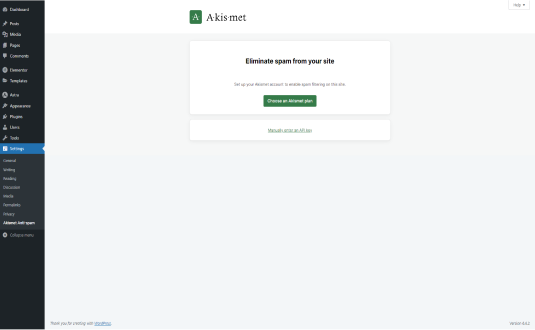
Akismet Anti-Spam Plugin for WordPress
Introduction
As a popular content management system, WordPress is a prime target for spam comments and malicious content. Spam not only clutters your site but can also harm your site’s reputation and SEO rankings. To combat this issue, the Akismet Anti-Spam plugin has emerged as one of the most effective solutions available. Developed by Automattic, the same company behind WordPress.com, Akismet offers robust spam protection for websites of all sizes.
What is Akismet?
Akismet is an anti-spam plugin that automatically checks comments, contact form submissions, and other user-generated content to filter out spam. It uses advanced algorithms and a vast database of spam content to identify and block unwanted messages before they reach your website. With Akismet, you can focus on your content while it takes care of spam filtering.
How Does Akismet Work?
Akismet operates on a simple principle: it checks incoming comments and submissions against its extensive spam database. Here’s a breakdown of how it functions:
- Comment Submission: When a user submits a comment or form entry on your site, Akismet captures this information.
- Data Verification: Akismet sends the data to its servers, where it is analyzed against a large dataset of known spam patterns, including previous submissions from other sites.
- Spam Detection: Using machine learning and heuristics, Akismet assigns a “spam score” to the submission. This score determines whether the comment is marked as spam.
- Action Taken: Depending on the score, the comment is either:
- Approved and published.
- Marked as spam and sent to the spam folder.
- Flagged for manual review by the site administrator.
- Learning from Feedback: Akismet continually learns from user feedback. If users mark a comment as spam or not spam, this information contributes to improving its detection algorithms.
Key Features
- Automatic Spam Filtering: Akismet automatically filters out spam comments and submissions, saving you time and effort.
- Comprehensive Spam Protection: It doesn’t just filter comments; Akismet also checks for spam in contact forms and other user-generated content, ensuring a comprehensive solution.
- User Dashboard: The plugin provides a user-friendly dashboard that allows you to view and manage spam comments easily. You can see statistics on how much spam has been blocked and review any comments that were flagged.
- API Integration: Akismet can be integrated with various plugins and themes, providing flexibility and compatibility with most WordPress installations.
- Comment History: You can review your comment history, allowing you to see which comments were marked as spam and why, helping improve your understanding of spam trends.
- REST API Support: For developers, Akismet offers REST API support, enabling integration with custom applications and services.
Installation and Setup
Setting up Akismet on your WordPress site is straightforward:
- Install the Plugin:
- Go to your WordPress admin panel.
- Navigate to Plugins > Add New.
- Search for “Akismet.”
- Click “Install Now” and then activate the plugin.
- Obtain an API Key:
- After activation, you’ll be prompted to enter an API key.
- Click on the link to get your API key. This will direct you to the Akismet website.
- Sign up for an account and select a plan (there is a free option for personal sites).
- Configure Settings:
- Once you have your API key, return to the plugin settings in WordPress.
- Enter your API key and save the settings.
- Adjust Options:
- You can customize various settings, such as how comments are treated, notifications for spam comments, and more.
Benefits of Using Akismet
- Time-Saving: By automating the spam detection process, Akismet frees you from manually moderating comments, allowing you to focus on content creation.
- Improved Site Performance: Reducing the volume of spam can improve your site’s performance and load times, as spam comments can consume server resources.
- Enhanced User Experience: Users will appreciate a cleaner comment section free from spammy messages, fostering a more engaging environment.
- SEO Benefits: Preventing spam from appearing on your site helps maintain your site’s credibility and SEO rankings, as search engines prioritize quality content.
- Regular Updates: As part of the Automattic family, Akismet receives regular updates and improvements, ensuring that it stays effective against evolving spam techniques.
Potential Drawbacks
While Akismet is highly effective, there are a few considerations:
- False Positives: Occasionally, legitimate comments may be flagged as spam, especially if they contain links or keywords commonly associated with spam. Regularly monitoring the spam folder is important to ensure you don’t miss genuine messages.
- Paid Plans for Commercial Sites: While Akismet offers a free plan for personal use, commercial websites are required to purchase a subscription. This might not suit every budget, especially for small businesses.
- Dependence on API: As an API-based service, your site’s spam filtering is reliant on Akismet’s servers. If there are issues with their service, it could impact your spam protection temporarily.
Conclusion
Akismet Anti-Spam is an essential tool for any WordPress website. Its ability to automatically filter out spam comments and submissions not only saves time but also enhances the overall user experience and maintains your site’s integrity. With a user-friendly interface, robust features, and regular updates, Akismet stands out as a leading solution for combating spam in the WordPress ecosystem.
By implementing Akismet, you can protect your site from unwanted content and focus on what really matters: creating and sharing high-quality content with your audience. Whether you run a personal blog, a business website, or a large e-commerce platform, Akismet provides the peace of mind that comes with knowing your site is safeguarded against spam.
How to install Akismet Anti-spam: Spam Protection
- Open the plugin installer. In your WordPress dashboard go to Plugins → Add New Plugin.
- Search for it. Type “Akismet Anti-spam: Spam Protection” and pick the one by Automattic.
- Install and activate. Click Install Now, then Activate.
Install with a zip file or WP-CLI
Download the zip from the WordPress.org plugin page, then go to Plugins → Add New Plugin → Upload Plugin, choose the file and click Install Now. Or from the command line:
wp plugin install akismet --activateRequirements: WordPress 5.8+ · PHP 7.2+ · tested up to WordPress 7.1.4
Hooks & customisation
Akismet Anti-spam: Spam Protection 5.7.2 fires 21 actions and 22 filters. Use them from your child theme or a snippets plugin to change how it behaves without editing its files.
// Filter the data that is used to generate the request body for the API call.
apply_filters( 'akismet_request_args', $comment, 'comment-check' );

// See filter documentation in init_hooks().
apply_filters( 'akismet_comment_nonce', get_option( 'akismet_comment_nonce' ) );

// Determines how many days a comment will be left in the Spam queue before being…
apply_filters( 'akismet_delete_comment_interval', 15 );

// Determines how many comments will be deleted in each batch.
apply_filters( 'akismet_delete_comment_limit', defined( 'AKISMET_DELETE_LIMIT' ) ? AKISMET_DELETE_LIMIT : 10000 );

// Which comment types should be ignored when counting a user's approved comments…
apply_filters( 'akismet_excluded_comment_types', array() );

// Allow plugins to do things with a successfully processed webhook request, like…
do_action( 'akismet_webhook_received', $request );Akismet Anti-spam: Spam Protection: frequently asked questions
Is Akismet Anti-spam: Spam Protection free?
Yes. Akismet Anti-spam: Spam Protection is free to download from the official WordPress.org plugin directory and is licensed under the GPL, so you can use it on as many sites as you like. Some developers sell a separate Pro version or paid add-ons; check the developer's website for details.
Is Akismet Anti-spam: Spam Protection safe to use?
Akismet Anti-spam: Spam Protection is actively maintained: the latest version was released 3 months ago. Users rate it 4.7 out of 5 from 1,186 reviews on WordPress.org. As with any plugin, keep it updated and only install it from WordPress.org or the developer.
Does Akismet Anti-spam: Spam Protection work with WordPress 7.1?
Yes. Akismet Anti-spam: Spam Protection is tested up to WordPress 7.1, the current release. It requires WordPress 5.8 or later and PHP 7.2 or later.
How many websites use Akismet Anti-spam: Spam Protection?
Akismet Anti-spam: Spam Protection is active on 5+ million WordPress sites, according to WordPress.org. It is currently at version 5.7.2, last updated on August 18, 2026.
What are the best alternatives to Akismet Anti-spam: Spam Protection?
Plugins that do a similar job and are actively maintained include Anti-Spam, Spam FireWall by CleanTalk (200,000+ installs), Antispam Bee (700,000+ installs), Spam Protection (30,000+ installs).
Can I customise Akismet Anti-spam: Spam Protection without editing its code?
Yes. Akismet Anti-spam: Spam Protection 5.7.2 fires 21 actions and 22 filters that you can use from a child theme or a code snippets plugin, so your changes survive plugin updates. Browse all 43 hooks with examples.
Done for you
Need Akismet Anti-spam: Spam Protection to do more?
Clear starting prices, an exact quote before any work, and changes built so plugin updates never wipe them.
Plugin customisation
from $149
New features or changed behaviour, without editing the plugin’s files.
- Built as a companion plugin, so updates never wipe it
- Exact quote before we start
- Tested on staging, then deployed
Typical turnaround: 3–7 business days
Choose thisCustom hook snippet
from $49
A small, update-safe change built on the plugin’s own hooks.
- Code written against the plugin’s actions and filters
- Tested on a staging copy of your site
- Install instructions included
Typical turnaround: 2–3 business days
Choose thisBug or conflict fix
from $79
Errors, broken layouts or two plugins that don’t get along.
- Find the cause on a staging copy
- Fix without breaking updates
- Explain what was wrong
Typical turnaround: 1–3 business days
Choose thisNot sure which fits? Describe what you need and we’ll suggest the simplest option.
Need Akismet Anti-spam: Spam Protection customised?
Tell us what you want changed, added or fixed and we'll reply with an estimate.
WP EXPERTS is independent and not affiliated with Automattic. Plugin names and logos belong to their owners. Version, rating and install figures from WordPress.org, checked Nov 17, 2026.





